






 English
 Русский
 简体中文
简体中文 한국어
한국어 Tiếng Việt
 Türkçe
 Français
 Deutsch
 Español
 Polski
 繁體中文
繁體中文 日本語
日本語 العربية
 Português (Brasil)
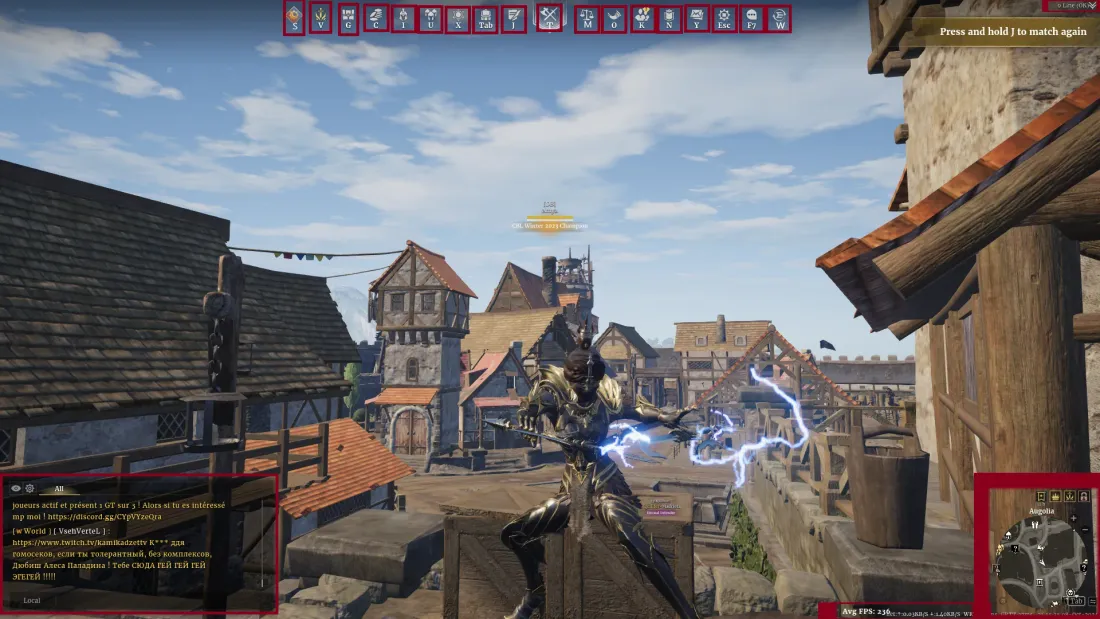
Every button and menu explained
As with any MMO, take a few minutes to open each menu and get familiar. It saves you a lot of “I wish I knew this sooner” moments. Keybinds may differ from yours, so go by the menu, not the letter.
- S
- Appears during special events, usually farming resources for a global pool in exchange for rewards.
- V
- Everything seasonal: battle pass, weekly challenges, the Season Challenge menu (change your seasonal focus to unlock units), the Campaign menu, the Seasonal Seal system, seasonal runes and the Seasonal Store.
- G
- Box Exchange menu. A time-limited box plus a permanent box you open with keys from activities, and an attire exchange with a pity system for duplicate skins.
- C
- The Store. The New Players and Returning Players packs are worth a look, the rest is typical and not too pay to win.
- I
- Your character page: reset stats, change runes, skins (Character), your mount (Mount), abilities (Skills) and performance stats (Career).
- U
- All your units: equip doctrines, choose veterancy paths, level units and preset your warband. Some units require unlocking others first.
- X
- The Doctrines menu: excavate with treatises or use the Doctrine Alchemy system. Check the bottom of the menu for the exchange button.
- Tab
- Your inventory.
- J
- Current quests and weekly objectives. Do as many as you can (bandit raids, crafting, fief quests). Daily quests can reset twice a day, so make the most of it.
- T
- Your main button to start game modes, see upcoming events and begin tutorial missions.
- O
- Crucial for new and returning players: progress pass and daily login rewards, plus Activities (exchange Territory War tokens, Mastery Scrolls and Supply Tokens) and News.
- K
- Friends list, create or join groups.
- N
- The House menu.
- Y
- Your mailbox, check it for messages and rewards.
- Esc
- Options: settings and keybindings.
- F7
- Same menu as O (progress pass, rewards, activities).
- W
- Support and live assistance.
- Top Right (Line Menu)
- The game splits players into parallel worlds. If you cannot see friends, switch to the same line.
- Bottom Right
- Map and FPS/Ping. The minimap is very customizable: circular for close awareness, square for the wider area.
- Bottom Left
- Chat window. Hide local chat, disable world chat or make alliance/whisper channels to suit your playstyle.